
An ecommerce SEO audit covers everything in a normal SEO site audit, plus the problems only stores have: filters that generate thousands of near-duplicate URLs, product variants competing with each other, out-of-stock pages, pagination, and category pages that should rank but don't get the internal links to do it. These issues sit on the templates that produce revenue, which is why they come first.
What's different about auditing a store
A store is mostly templates: homepage, category (collection) pages, product pages, filters, search results, cart. One template fix changes hundreds or thousands of URLs. So an ecommerce audit is organised by template, and every finding is weighed against which templates carry revenue — usually categories and top products.
1. Category and product page targeting
Category pages usually target broad, high-volume queries ("running shoes"), product pages target specific ones ("[brand] [model] trail shoe"). Check:
- Does each important category have unique, useful copy and a title that targets its query, rather than just a product grid?
- Are categories and blog posts competing for the same query? See keyword cannibalisation.
- Do product pages have unique descriptions, or manufacturer copy duplicated across every retailer?
Our ecommerce SEO guide covers why category pages often earn more search traffic than product pages.
2. Faceted navigation and filters
Filters for colour, size, price, brand and sort order each create new URLs. Combined, they multiply fast.
Illustrative arithmetic: every filter multiplies crawlable URLs. 1 category × 5 colours × 6 sizes × 4 price bands × 3 sort orders = 360 URL combinations from one page.
Google says faceted navigation is by far the most common source of overcrawling problems site owners report to it. Its December 2024 documentation gives two routes:
- If you don't need facet URLs indexed (most combinations), prevent crawling, for example with robots.txt rules on the filter parameters.
- If some facet URLs deserve to rank (say, "black running shoes" has real demand), make those specific combinations clean, crawlable, indexable pages with their own titles and copy, and keep the rest uncrawled.
Audit checks:
- Crawl the site and count URLs with filter parameters. How many are there relative to real products?
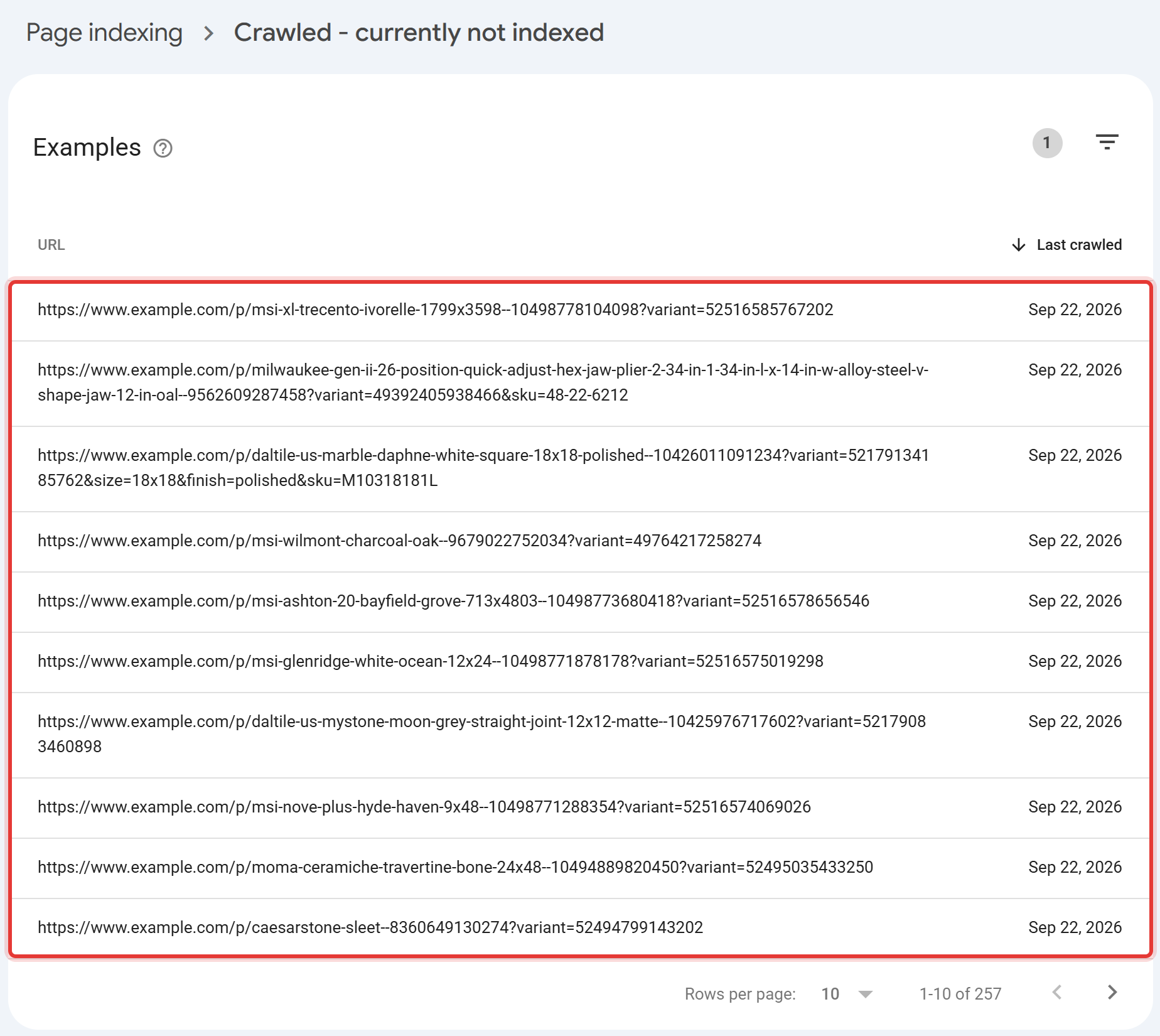
- In Search Console's Page indexing report, look for filter URLs in "Crawled – currently not indexed" or "Duplicate without user-selected canonical".
- Check that filter links aren't creating crawl paths into infinite combinations (for example, multi-select filters with no limit).
3. Product variants and duplicates
Colour and size variants can be one URL with options, or separate URLs. Either can work; the audit question is whether it's consistent:
- If variants have separate URLs, do they have distinct content (images, names) and canonicals pointing where you intend?
- Does the same product appear at several paths (
/collection-a/productand/collection-b/product)? Canonicals and internal links should agree on one.
4. Out-of-stock and discontinued products
| Situation | Recommended handling |
|---|---|
| Temporarily out of stock | Keep the page live (200), show availability and alternatives, keep structured data availability accurate |
| Permanently discontinued, with a close replacement | 301 to the replacement or the parent category |
| Discontinued, no replacement, page has links or traffic | Keep as an informational page with alternatives, or 301 to the most relevant category |
| Discontinued, no links, no traffic | 404 or 410 |
The common failure: thousands of discontinued products redirected to the homepage, which Google tends to treat as soft 404s.
5. Pagination and internal search
- Pagination: each paginated category page should be crawlable through real
<a href>links and self-canonical. Canonicalising page 2+ to page 1 hides the products listed only on later pages. - Internal search results (
/search?q=) generally shouldn't be crawlable or indexed; they create unlimited thin URLs.
6. Product structured data
Validate Product (and merchant listing) markup on the product template with the Rich Results Test. Check price, currency, availability and review data match what's visible on the page. Product markup still drives rich results; don't spend time on FAQ markup for rich results — Google stopped showing them on 7 May 2026. Detail in schema markup.
7. Template speed
Audit Core Web Vitals by template in Search Console, not by single URL. Product and category pages are image-heavy, and slow loading (LCP) is the most common mobile failure across the web: only 62% of mobile pages had a good LCP in June 2025, per the 2025 Web Almanac. Typical culprits on stores: oversized hero and gallery images, apps or plugins injecting scripts, and review widgets. See Core Web Vitals.
8. Internal linking to categories
Check how many internal links your top categories receive, and from where. Stores often link heavily to "New in" and promotional pages while key categories rely on the main menu alone. Add links from related categories, buying guides and best-selling product pages.
Platform notes: Shopify, WooCommerce, Magento
Shopify. Products are reachable at /products/ and inside collection paths (/collections/x/products/); check that internal links point to the canonical /products/ URL. Some themes and apps add filter parameters, duplicate tag pages and heavy scripts. More in Shopify SEO.
WooCommerce (WordPress). Watch tag, attribute and author archives creating thin indexable pages, plugin overlap (two SEO plugins outputting conflicting tags), and layered-navigation parameters. See WordPress SEO.
Magento / Adobe Commerce. Layered navigation and multiple store views make faceted URLs and hreflang the usual top issues.
For a store audit done for you, the Site SEO Audit covers up to 500 URLs and includes cross-page cannibalisation and internal-link analysis; for larger catalogues, ask for a custom scope. E-Commerce Opportunity is a lighter starting point for finding category and niche gaps.
Frequently asked questions
What's included in an ecommerce SEO audit? Everything in a standard site audit, plus faceted navigation, product variants, out-of-stock handling, pagination, internal search, product structured data, template speed and internal linking to categories.
Should filter pages be indexed? Only the combinations with real search demand and their own useful content. Google recommends preventing crawling of facet URLs you don't need indexed.
What should I do with out-of-stock products? Keep temporarily unavailable products live with accurate availability. For discontinued products, redirect to a close replacement or category when one exists; otherwise return 404 or 410. Avoid redirecting everything to the homepage.
How often should a store be audited? Annually, and before any platform migration, theme change or large catalogue restructure.
Get a store-specific audit done properly
Generic SEO audits run the same checklist against a brochure site and a 10,000-SKU store, which is exactly how facet overcrawling, orphaned out-of-stock pages and template-wide Core Web Vitals problems go unnoticed until they've cost months of crawl budget and revenue. A store needs an audit that treats every template as a multiplier, not a single page.