
An SEO site audit is a structured review of everything that decides whether a website can be found, indexed and chosen in search: how search engines crawl it, which pages they keep, how those pages are built and linked, how fast they are for real users, and how the site compares with the competitors that outrank it. The output is not a score. It is a ranked list of fixes.
This guide walks through the process a senior SEO follows, the order that saves time, and how to decide what to fix first. It also covers audit advice that circulates widely but no longer applies.
What is an SEO site audit?
An SEO site audit evaluates a whole website against the factors that affect organic search performance — crawlability, indexation, technical health, on-page signals, content, internal links, backlinks and, increasingly, visibility in AI-generated answers — and turns the findings into a prioritised action plan.
The word "site" matters. Many problems only exist at site level: two pages competing for the same query, a template that ships a broken canonical to 4,000 URLs, a section nobody links to. A page-by-page review can't see them.
| Type | Scope | Best for | Misses |
|---|---|---|---|
| SEO site audit | Every URL in scope plus cross-page patterns | Diagnosing a site, planning a year of work, before hiring or after a traffic drop | Fine detail on any single page |
| Page audit (web page audit) | One URL in depth | A homepage or money page that underperforms | Cannibalisation, orphan pages, template issues |
| Technical SEO audit | Crawling, indexing, rendering, speed, structured data | Migrations, JavaScript sites, indexation problems | Content quality, links, competitive gaps |
When you actually need one
Audits are worth the effort at decision points, not on a fixed calendar:
- Organic traffic dropped and you can't tie it to seasonality or a known change.
- Before or after a migration, redesign or platform change. Most migration losses trace back to redirects, canonicals or blocked resources that a pre-launch audit would have caught.
- You inherited a site or are about to hire an agency and need a baseline to judge their work against.
- Growth has stalled despite publishing, which usually points to cannibalisation or internal-linking problems.
- Annually, for any site where search drives meaningful revenue.
If none of these apply, a quarterly 30-minute check in Search Console is usually enough. See how to check your website's SEO.
What a complete site audit covers
A full audit covers eight areas. Tools automate parts of each one; none of them automate the judgement.
| Area | What gets checked | Main evidence |
|---|---|---|
| Crawlability | robots.txt, status codes, redirects, internal link paths, JavaScript rendering | Crawler, server logs |
| Indexation | Which URLs Google keeps and why the rest are excluded; canonicals; noindex | Search Console Page indexing, URL Inspection |
| Page experience | LCP, INP, CLS from real users; HTTPS; mobile layout | Chrome UX Report, PageSpeed Insights |
| On-page signals | Titles, meta descriptions, headings, structured data, image alt text | Crawler, by template |
| Content | Coverage of the topics you should rank for, thin and duplicate pages, cannibalisation | Search Console queries, keyword map |
| Internal linking | Click depth, orphan pages, where link equity flows, anchor text | Crawler link graph |
| Backlinks | Authority, relevance, risky patterns, lost links | Backlink index (Ahrefs, Semrush, Majestic) |
| AI search visibility | Whether AI crawlers can access the site; whether AI answers cite you or competitors | robots.txt, manual and tracked prompts |
International sites add hreflang and geotargeting. Local businesses add Business Profile and citation consistency.
How to do an SEO site audit, step by step
The order below is deliberate: each step narrows the next one. Skipping straight to a crawler's issue list is the most common way to spend a week fixing things that don't matter.
1. Set the goal and pull a baseline
Write down why the audit is happening — traffic drop, migration, growth plateau — because it decides what "important" means. Then export 16 months of Search Console performance data (clicks, impressions, queries, pages) and note the pages that drive revenue or leads. Every later finding gets weighed against those pages.
2. Crawl the site the way Google does
Run a crawler (Screaming Frog, Sitebulb, Semrush Site Audit, Ahrefs Site Audit) with three settings changed from the defaults:
- User agent set to Googlebot smartphone, because Google indexes the mobile version.
- JavaScript rendering on if the site uses a JavaScript framework, so you see what Google sees after rendering.
- Search Console and analytics connected, so every crawled URL carries real clicks and sessions.
Also feed the crawler your XML sitemap URLs. You need both lists for the next step.

3. Reconcile sitemap, crawl and index
This is the step most audits skip, and it's where the expensive findings are. Compare three lists:
- URLs in your XML sitemap — what you say matters.
- URLs the crawler found by following links — what's reachable.
- URLs Google has indexed — from Search Console's Page indexing report.
The reconciliation triangle: where sitemap, crawl and index disagree.
Each mismatch has a typical cause:
- In the sitemap but not reachable by links: orphan pages. Google may index them but they receive little internal authority.
- Reachable but not in the sitemap: often parameter URLs, filtered views, staging copies or old content nobody remembered.
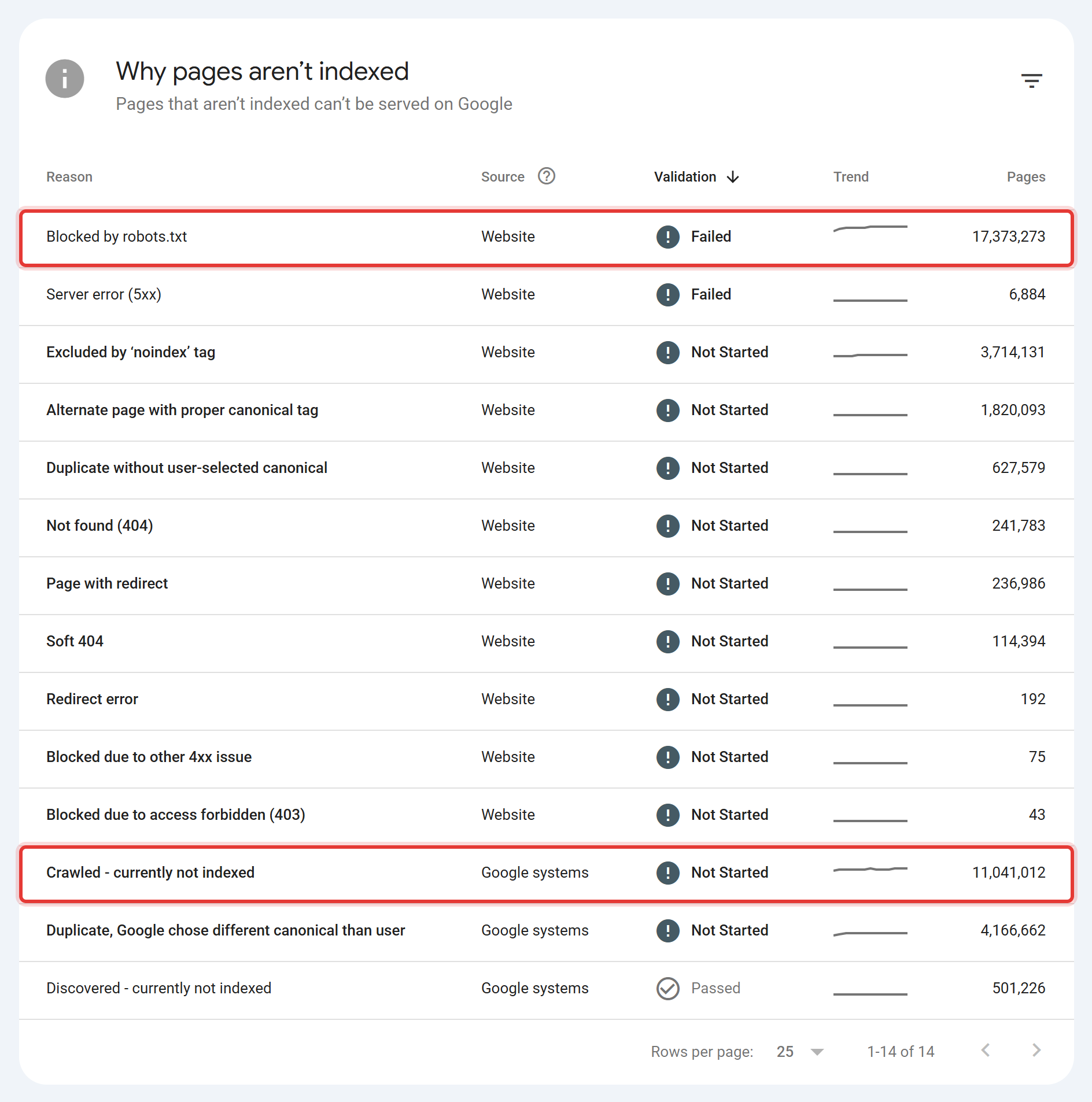
- Crawled but not indexed: check the reason in Search Console. "Crawled – currently not indexed" usually signals quality or duplication; "Duplicate, Google chose different canonical" means Google overruled your canonical.
- Indexed but not in the sitemap: pages you didn't intend to publish, or a sitemap that's out of date.
4. Check crawl and index controls
Work through the controls that tell search engines what to do:
- robots.txt returns a 200 and doesn't block CSS, JavaScript or sections you want indexed. A 5xx response on robots.txt can make Google treat the whole site as temporarily blocked.
- Status codes: 4xx pages that still receive internal links or backlinks, redirect chains (A→B→C), and temporary 302s used for permanent moves.
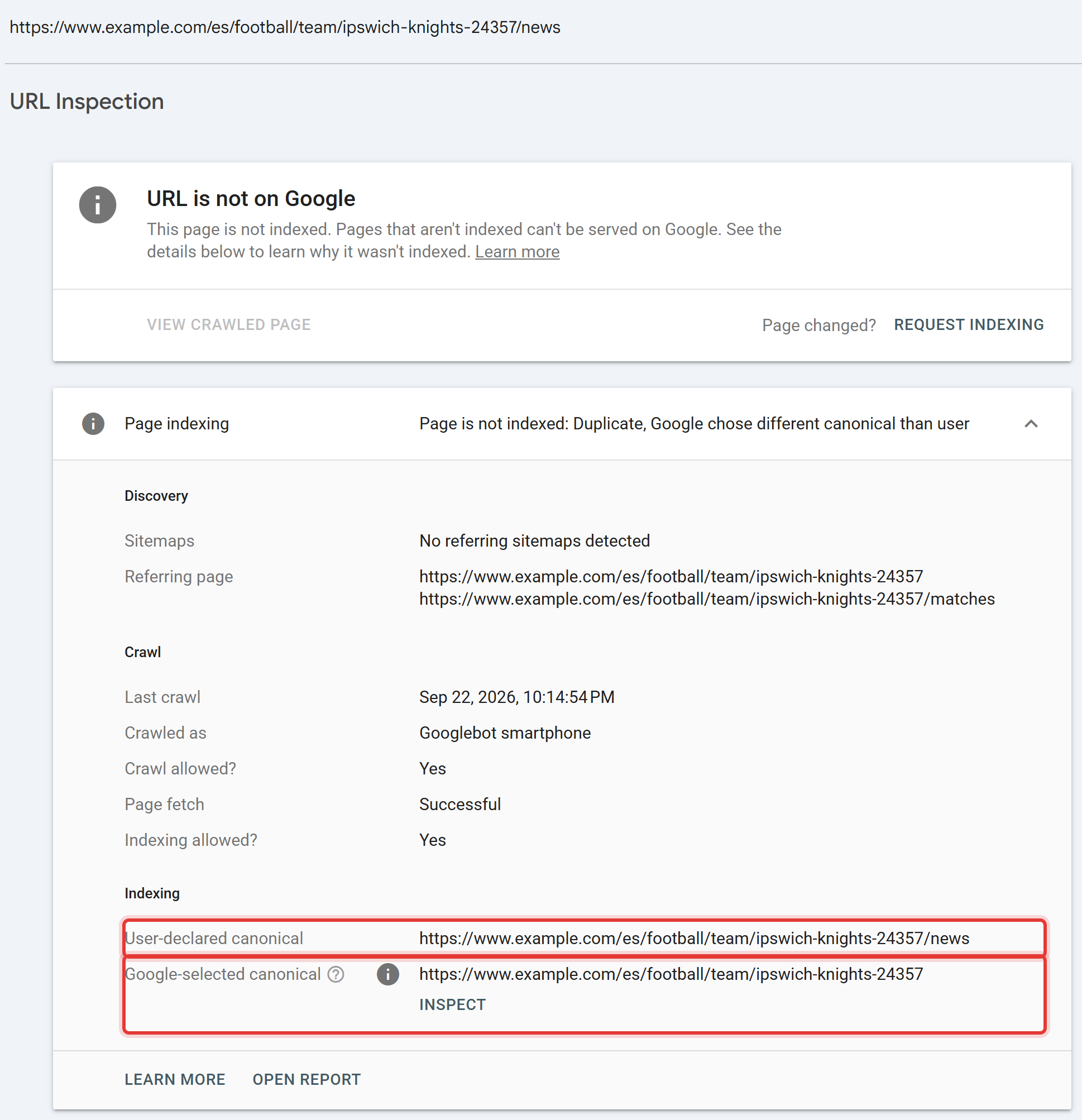
- Canonical tags point to indexable 200 URLs, appear in the raw HTML rather than being injected late by JavaScript, and match what Google selected. Use URL Inspection to compare "User-declared canonical" with "Google-selected canonical".
- noindex isn't on pages you want indexed — and isn't combined with a robots.txt block, which stops Google from ever seeing the noindex.
5. Measure page experience with field data
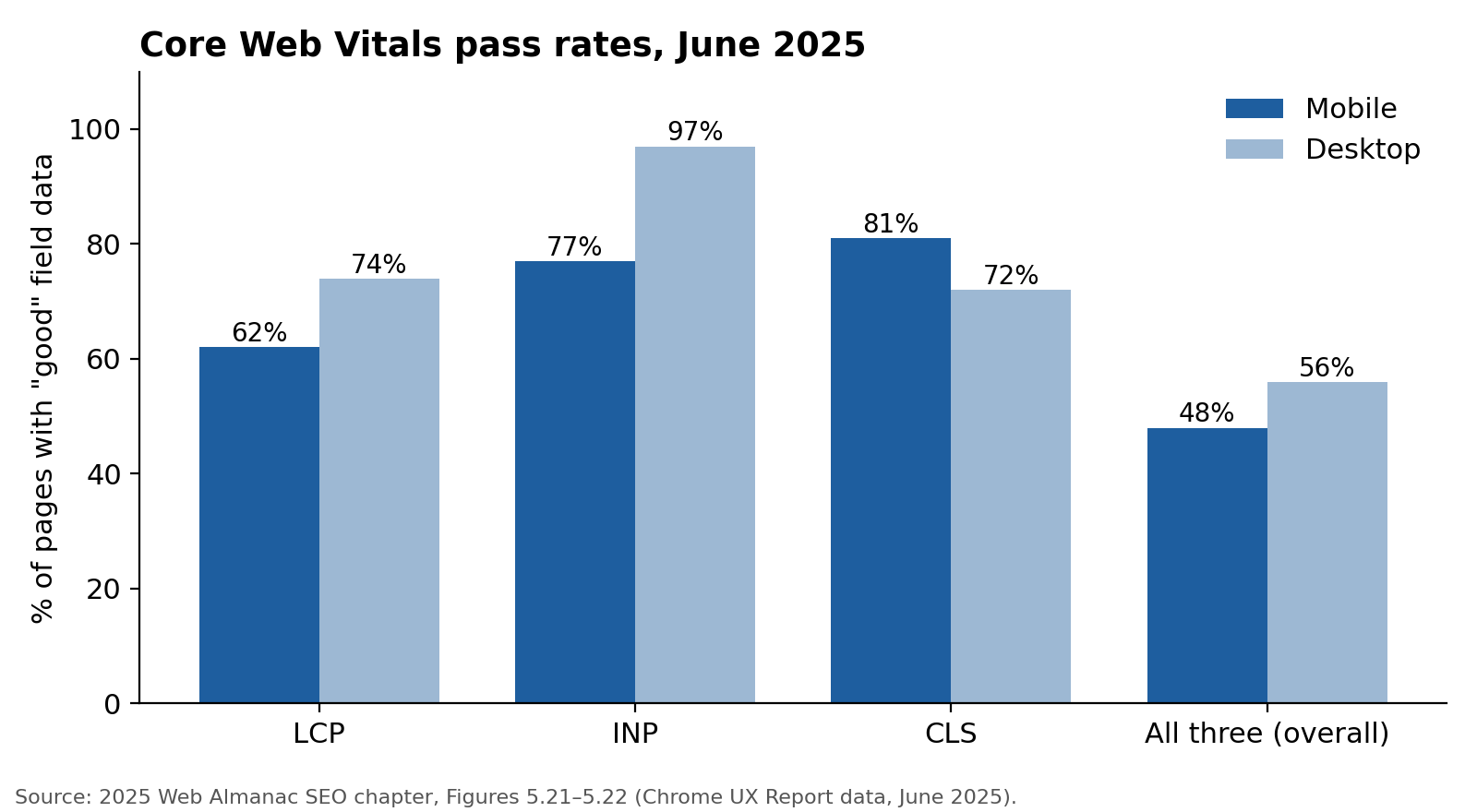
Google's Core Web Vitals thresholds are an LCP of 2.5 seconds or less, an INP of 200 milliseconds or less and a CLS of 0.1 or less, measured at the 75th percentile of real visits. Use field data from the Chrome UX Report (shown at the top of PageSpeed Insights and in Search Console's Core Web Vitals report), not a single Lighthouse lab run.
Audit by template rather than by URL: product pages, category pages and blog posts each share code, so one fix usually lifts hundreds of pages.
6. Audit on-page elements by template, not by page
Export titles, meta descriptions, H1s, structured data and image alt text for every URL, then group by template. You're looking for patterns: a category template with a generic title, a blog template missing an H1, product pages with identical meta descriptions. Fix the template, not 900 pages one by one.
Check structured data for validity and for types that still produce visible results in Google, such as Product, Article and BreadcrumbList. Google stopped showing FAQ rich results in May 2026, so missing FAQPage markup isn't a finding on its own.
7. Find content gaps and cannibalisation
Pull Search Console queries with their landing pages. Where two or more URLs collect impressions for the same query and neither ranks well, you may have cannibalisation. Not every overlap is a problem. Two pages ranking 2 and 4 for a broad term is often fine; two pages ranking 14 and 17 is usually one page too many. Our keyword cannibalisation guide covers the diagnosis.
Then compare the topics you rank for against the topics your customers search. The gaps become the content plan.
8. Map internal linking
From the crawl, check click depth (important pages should be reachable within three clicks of the homepage), orphan pages, and which pages receive the most internal links. Revenue pages often get fewer internal links than the blog posts and footer pages around them. More detail in internal linking for SEO.
9. Review backlinks and the competitive gap
Look at the referring domains you have, the ones you've lost, and the ones your top three search competitors have that you don't. Most "toxic link" warnings need no action; see toxic backlinks before you disavow anything. For a competitor website audit, the useful question is not "how many links do they have" but "which pages earn their rankings, and why". The competitor SEO analysis guide covers picking the right competitors.
10. Check AI search visibility
Two separate checks:
- Access. Read robots.txt for rules aimed at AI crawlers (GPTBot, ClaudeBot, PerplexityBot) and the Google-Extended token, which controls use of your content for Google's AI models rather than search crawling. Blocking them is a business decision, not an error, but it should be deliberate. In the 2025 Web Almanac, GPTBot was named in 4.5% of desktop robots.txt files, up from 2.9% a year earlier.
- Citation. Run the questions your buyers ask through ChatGPT, Perplexity and Google's AI features, and record who gets cited. Ranking well on Google is not a reliable proxy for this.
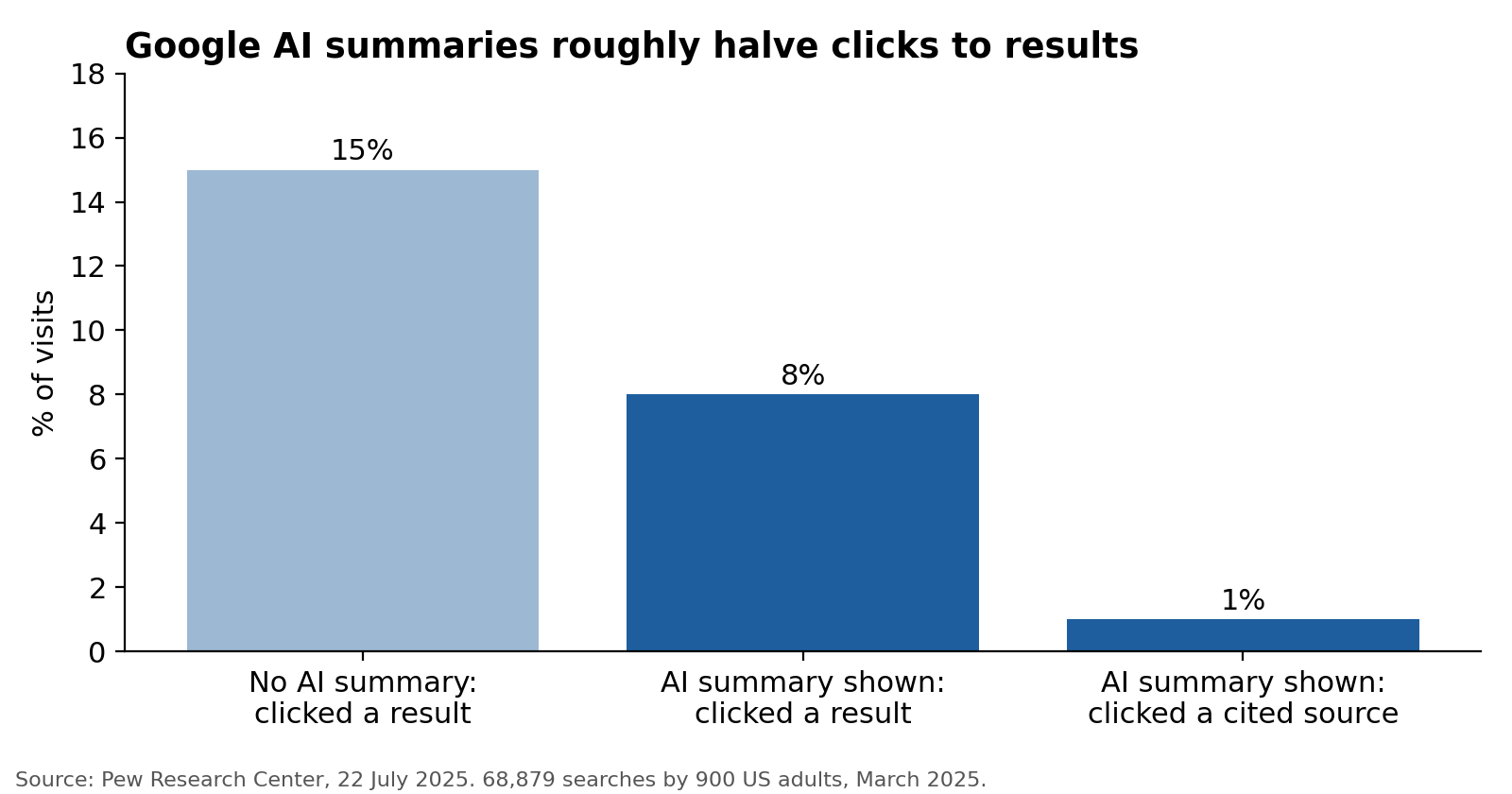
This matters because AI summaries change click behaviour. Pew Research found that when Google showed an AI summary, users clicked a traditional result on 8% of visits, against 15% when no summary appeared.
11. Prioritise and write the fix list
A list of 300 issues is not an audit. Score each finding on four factors:
- Impact — how much traffic or revenue the affected pages carry (1–5)
- Ease — how simple the fix is for your team (1–5)
- Confidence — how sure you are the fix will move results (1–5)
- Days to fix — the realistic effort
Priority score = (Impact × Ease × Confidence) ÷ Days to fix. Sort highest first.
| Finding | Impact | Ease | Confidence | Days | Score |
|---|---|---|---|---|---|
| Category template canonical points to page 1 on all paginated pages | 5 | 4 | 4 | 2 | 40 |
| 38 product pages return 404 but still get internal links | 4 | 5 | 5 | 1 | 100 |
| Blog template has no H1 | 2 | 5 | 3 | 1 | 30 |
| Image alt text missing on 1,200 images | 1 | 2 | 2 | 10 | 0.4 |
*Illustrative scores for a hypothetical store. The point: the 1,200 missing alt attributes look alarming in a tool report and score lowest here.*
Write each finding so a developer can act on it without a meeting: the issue, affected URLs or template, why it matters, the exact fix, and how to verify it.
How common are these problems?
The basics are missing more often than most site owners assume. The 2025 Web Almanac, which analyses roughly 16 million sites, found:
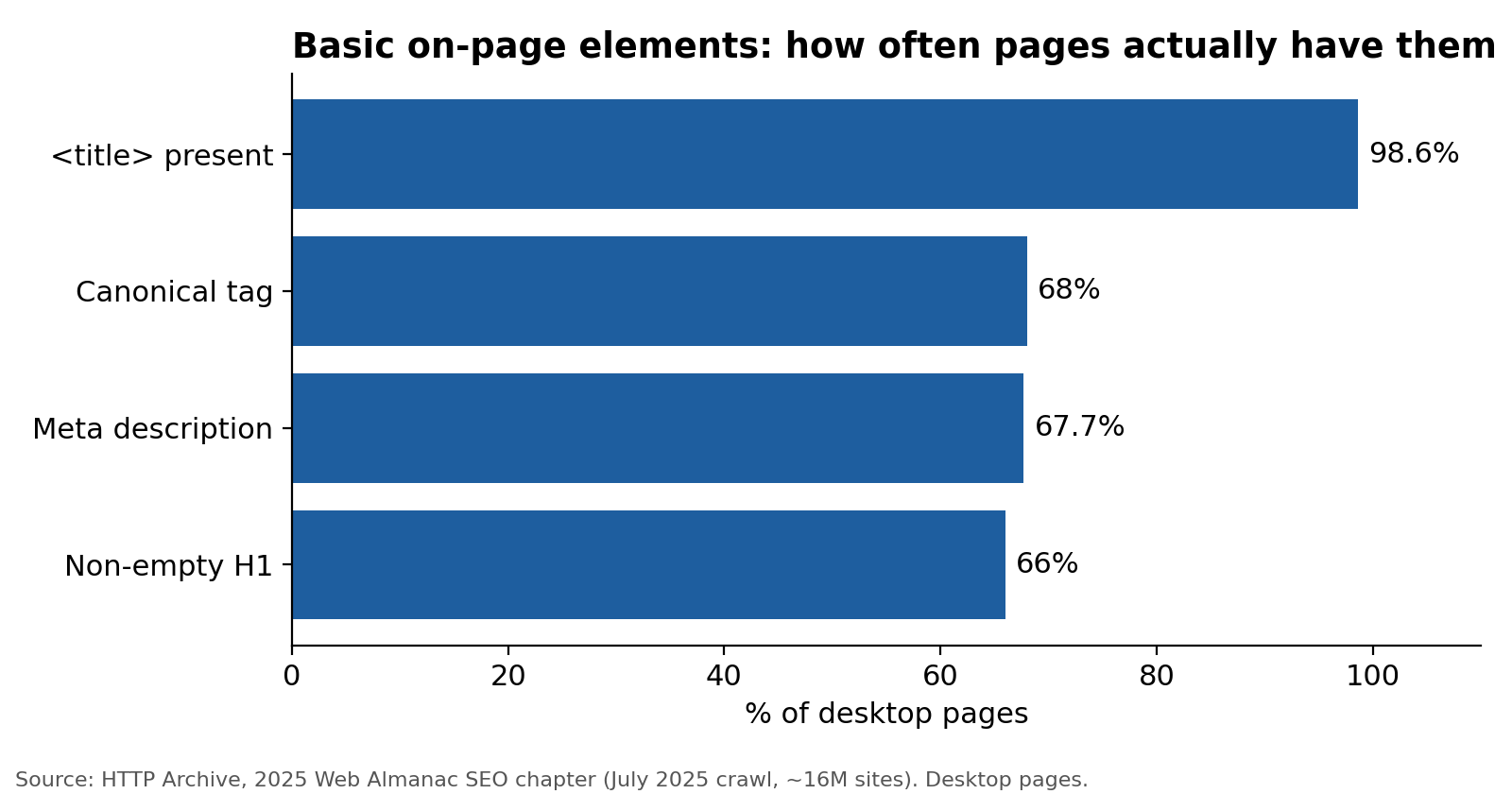
- Almost every page has a title tag (98.6% of desktop pages), but a third have no meta description (67.7% have one) and one in three has no usable H1 (66% have a non-empty H1).
- About 10% of pages have invalid HTML in the
<head>, which can push title, canonical or robots tags into the body, where search engines ignore them. Crawlers rarely flag this clearly. - Around 13% of sites return a 404 for robots.txt. That's harmless on its own (Google treats a missing file as "crawl everything"), but it's often a sign nobody owns crawl control.
None of these on its own decides rankings. Together they tell you how carefully a site has been maintained, and they're cheap to fix at template level.
Audit advice that's now out of date
Plenty of audit guides and checklists still include steps that no longer apply. Check any audit you commission or run for these:
| Outdated advice | What changed | What to do instead |
|---|---|---|
| "Run Google's Mobile-Friendly Test" | Google retired the tool, its API and the Mobile Usability report on 1 December 2023 | Use Lighthouse or PageSpeed Insights, and check rendered mobile HTML in URL Inspection |
| "Add FAQ schema to win rich results" | HowTo rich results ended in 2023; FAQ rich results stopped showing on 7 May 2026 | Use schema for types that still show results, and for entity clarity |
| "Optimise your crawl budget" for a 300-page site | Google's guidance targets sites with 1M+ pages, or 10k+ pages changing daily | Fix duplicates and soft 404s for hygiene; skip crawl-budget work on small sites |
| "Improve your site health score to 90+" | Health scores are each tool's own weighting, not a Google metric | Track indexed pages, Core Web Vitals pass rate and organic conversions instead |
| "Measure speed with a Lighthouse score" | Google uses field data (CrUX) for Core Web Vitals | Report the 75th-percentile field values per template |
| "Fix the FID score" | INP replaced First Input Delay on 12 March 2024 | Audit INP |
Automated audit tools vs. a full audit
Automated tools — Semrush Site Audit, Ahrefs Site Audit, Screaming Frog, free checkers — are good at finding what is technically wrong on a page: broken links, missing tags, redirect chains, duplicate titles. They're fast and cheap. Semrush's free account crawls 100 pages a month; Screaming Frog's free version crawls 500 URLs.
They are weak at three things:
- Business impact. A tool can't know which pages make money, so it ranks 1,200 missing alt attributes above a broken canonical on your top category.
- Intent and cannibalisation. Deciding whether two pages compete needs Search Console data and judgement.
- Why competitors win. Tools report gaps; explaining them takes someone reading the SERP.
A practical split: use a tool for the crawl, then spend the human time on steps 3, 7, 9 and 11. Our guide to free SEO audit tools shows what each free option actually checks.
If you'd rather have the whole thing done — every URL graded, cross-page issues mapped, AI citation data measured and a developer-ready fix list — that's what the TapasSEO Site SEO Audit delivers at a fixed price.
Frequently asked questions
How often should you do an SEO site audit? Run a full audit once a year for sites where search matters to revenue, and always before and after a migration or redesign. Between audits, a monthly or quarterly check of Search Console's Page indexing and Core Web Vitals reports catches most new problems.
How long does an SEO site audit take? For a small site (under 100 pages) an experienced SEO can complete a thorough audit in a few days. Sites with thousands of URLs, JavaScript rendering or several languages take weeks, mostly in steps 3, 7 and 11. The crawl itself is the quick part.
Can I do an SEO audit for free? Yes, for a small site. Google Search Console, PageSpeed Insights, the Rich Results Test and Screaming Frog's free 500-URL crawl cover most technical checks. What free tools can't supply is backlink and competitor data at scale, or the prioritisation.
What is a good site health score? There isn't a standard one. Each tool weights issues differently, so the same site can score 70 in one and 90 in another. Judge the audit by whether indexed pages, Core Web Vitals and organic conversions improve after fixes.
Will an SEO audit improve my rankings? Not by itself. An audit identifies what's holding the site back; rankings change when the fixes ship. That's why a good audit ranks fixes by impact and writes them so developers can implement them without translation.
What's the difference between a website audit and an SEO audit? "Website audit" is broader and can include accessibility, UX, security and conversion. An SEO audit focuses on search visibility. In practice most people searching "website audit" want the SEO version.
Get your SEO site audit done for you
Everything above is the process. Running it properly — the full sitemap/crawl/index reconciliation, template-level audits across every page type, the backlink and competitive gap, AI citation checks against real prompts, and a fix list scored by actual impact rather than a tool's severity label — takes a senior SEO several days even on a small site, and weeks on a large one.
TapasSEO's Site SEO Audit runs that same process on your site: every URL graded, cross-page issues mapped, AI visibility measured, and a developer-ready fix list delivered at a fixed price and a fixed deadline — no vague scope, no hourly clock.