
A technical SEO audit checks whether search engines can discover, crawl, render and index a website's pages, and whether those pages load well enough for real users. It covers robots.txt, status codes, redirects, canonical tags, sitemaps, JavaScript rendering, site architecture, Core Web Vitals, structured data and hreflang. Content quality and backlinks belong to the wider SEO site audit.
This guide follows the order in which Google processes a page, so problems that block everything downstream are found first.
What is a technical SEO audit?
A technical SEO audit is a review of the infrastructure that lets search engines access and understand a website: crawl controls, server responses, indexing directives, canonicalisation, rendering, site structure, performance and markup. Its output is a list of fixes ranked by how much search visibility each issue is costing.
| In scope | Out of scope (covered by a full site audit) |
|---|---|
| robots.txt, meta robots, X-Robots-Tag | Keyword targeting and content gaps |
| Status codes, redirects, soft 404s | Content quality and E-E-A-T |
| Canonical tags and duplicate URLs | Backlink profile |
| XML sitemaps | Competitive gap analysis |
JavaScript rendering, <head> validity | Brand and AI citation share |
| Click depth, orphan pages, internal links | |
| Core Web Vitals, HTTPS, mobile parity | |
| Structured data validity | |
| hreflang | |
| Server logs and crawl budget (large sites) |
When to run one
- Before and after a migration, redesign, CMS change or domain move.
- After an unexplained traffic drop, especially one that hits the whole site at once.
- When a JavaScript framework is introduced (React, Vue, Next.js or similar) or rendering changes.
- When Search Console's Page indexing report shifts suddenly, for example a jump in "Crawled – currently not indexed".
- Once a year as maintenance for sites where search drives revenue.
The often-quoted "every six months" is reasonable for active sites, but the triggers above matter more than the calendar.
Tools you need
A technical audit doesn't need an expensive stack:
| Tool | Job | Cost (checked Sep–Oct 2026) |
|---|---|---|
| Google Search Console | Indexing reasons, URL Inspection, crawl stats, Core Web Vitals field data | Free |
| PageSpeed Insights / Lighthouse | Field and lab performance data | Free |
| Rich Results Test / Schema Markup Validator | Structured data validity | Free |
| Screaming Frog SEO Spider | Desktop crawler with JavaScript rendering | Free up to 500 URLs; £199 per licence per year (1–4 licences) |
| Ahrefs Site Audit | Cloud crawler | Free for verified sites on the free plan; Lite from $129/month |
| Semrush Site Audit | Cloud crawler | 100 pages/month free; Pro $139.95/month or $117.33/month billed annually |
| Server log files | What Googlebot actually requested | Free (from your host or CDN) |
Prices change; confirm on the vendor's pricing page before budgeting.
How to conduct a technical SEO audit
The search pipeline — Discover, Crawl, Render, Index, Serve — with the 13 audit steps mapped to the stage each one tests.
1. Crawl as Googlebot smartphone
Google indexes the mobile version of your site, so configure your crawler accordingly:
- User agent: Googlebot Smartphone.
- JavaScript rendering on for any site built with a JavaScript framework or that injects content client-side.
- Seed the crawl with the homepage and the XML sitemap(s), and connect Search Console and analytics so each URL carries clicks and impressions.
- Respect robots.txt on the first crawl, so you see what Google sees. Run a second crawl ignoring it only if you need to find blocked sections.
2. robots.txt and server responses
Check that /robots.txt:
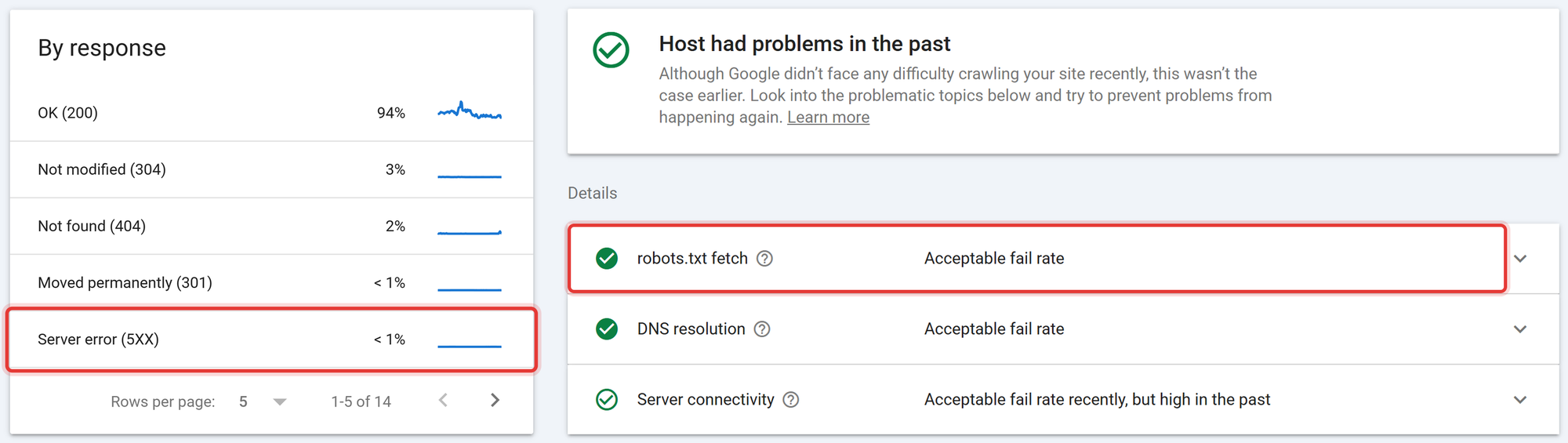
- Returns 200. A 404 is treated as "no restrictions", which is harmless. A 5xx error is the dangerous one: Google can treat the whole site as temporarily disallowed until it gets a valid response. In the 2025 Web Almanac, 84.9% of robots.txt requests returned 200, about 13% returned 404 and about 1% timed out.
- Doesn't block CSS or JavaScript that pages need to render.
- Doesn't block sections you want indexed, including after a migration where staging rules were copied to production.
Then open Search Console → Settings → Crawl stats and look at responses by type. A rising share of 5xx responses or slow average response times is a server problem, not an SEO tweak.
3. Indexability directives
List every URL with noindex (meta robots or X-Robots-Tag header) and confirm each is intentional. Then check for these conflicts:
- noindex + robots.txt block on the same URL. Google can't crawl the page, so it never sees the noindex, and the URL can stay indexed.
- noindex on pages in the XML sitemap. Contradictory signals; remove them from the sitemap or remove the noindex.
- Both meta robots and X-Robots-Tag set on the same page with different values. The more restrictive directive applies, which may not be what you intended.
4. Canonicalisation
For each indexable template, check that canonical tags:
- Point to a 200, indexable URL (not a redirect, a 404 or a noindexed page).
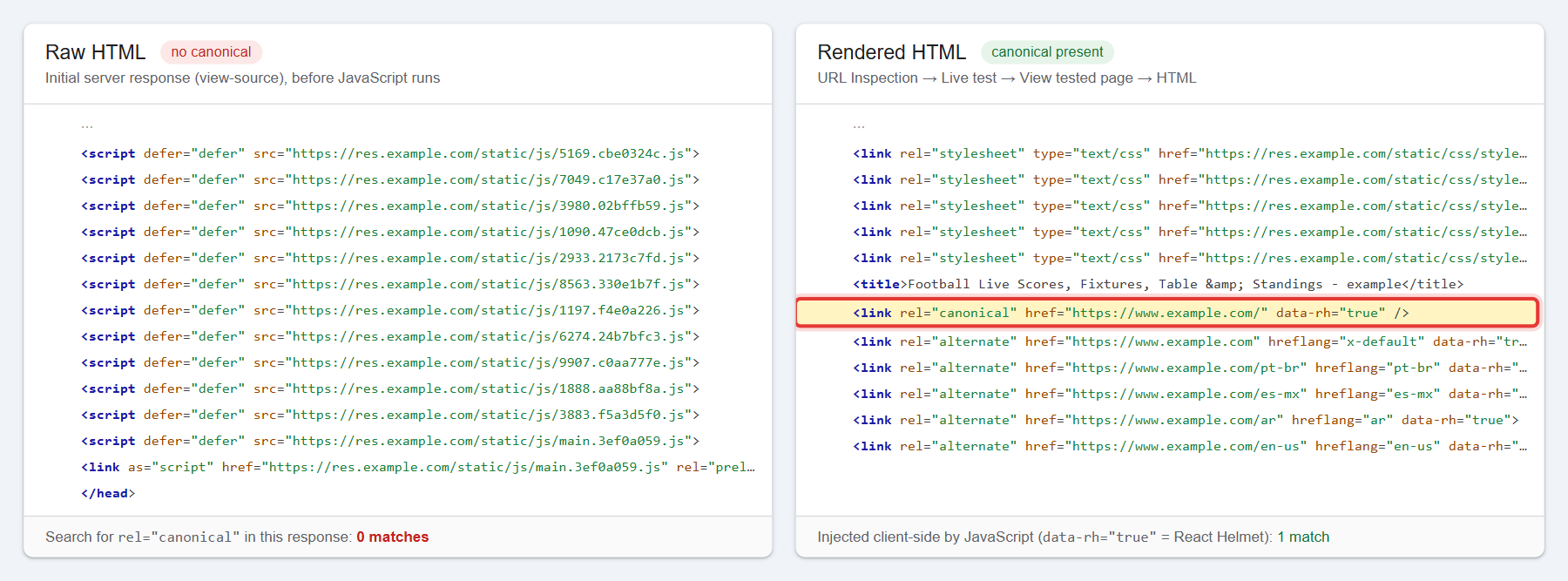
- Are present in the raw HTML, not only added by JavaScript. The Web Almanac found the canonical changes after rendering on 2.7% of desktop and 3.0% of mobile pages, and raw and rendered canonicals conflict outright on 0.7%.
- Are consistent with internal links and the sitemap. If your internal links point to
/page?ref=navand the canonical says/page, you're sending mixed signals.
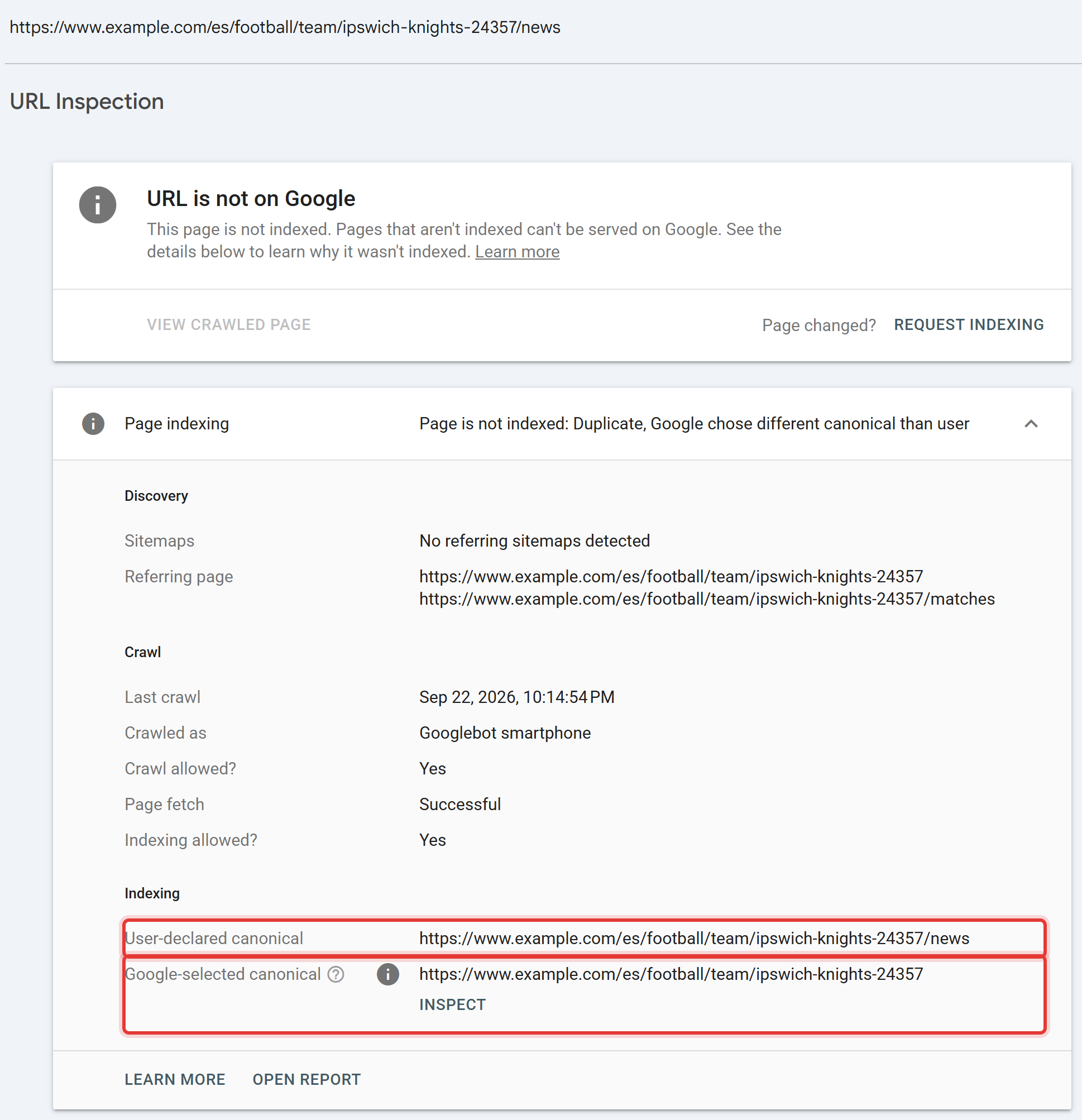
Then sample important URLs in Search Console's URL Inspection and compare User-declared canonical with Google-selected canonical. A mismatch means Google has overruled you, usually because other signals point elsewhere. The canonical tags guide covers the five most common mistakes.
5. Status codes and redirects
From the crawl, list:
- 4xx URLs that still receive internal links. Update the links; redirect the URL if it has backlinks or traffic history.
- Redirect chains (A → B → C) and loops. Point every internal link and every redirect directly at the final destination.
- 302s used for permanent moves. Use 301 or 308 for permanent changes.
- Soft 404s: pages that return 200 but show "not found" or empty content. Search Console lists them in Page indexing. They waste crawling and dilute quality signals.
More on redirect choice in 301 redirects.
6. XML sitemaps
A sitemap should contain only URLs you want indexed: 200 status, indexable, self-canonical. Check:
- Every sitemap URL returns 200 and isn't noindexed, redirected or canonicalised elsewhere.
lastmodreflects real content changes, not the date the sitemap was generated.- Sitemaps are referenced in robots.txt and submitted in Search Console.
- No sitemap exceeds 50,000 URLs or 50 MB uncompressed (use a sitemap index beyond that).
A clean sitemap turns Search Console's indexing report into a diagnostic: if a URL is in the sitemap and not indexed, you know it's a problem. See XML sitemaps.
7. Rendering and JavaScript
Compare the raw HTML (view-source, or the crawler's "original HTML") with the rendered HTML for each major template. Check that these exist in the raw HTML, or at minimum in the rendered HTML Google sees in URL Inspection:
- Main content and headings
- Internal links as real
<a href>elements (not click handlers) - Title, meta robots, canonical and hreflang
Also check for invalid elements in <head>. If an <img>, <div> or <a> appears in the head, browsers and parsers can end the head early and treat everything after it as body content, where title, canonical and robots tags no longer work. About 10% of pages have this problem, per the 2025 Web Almanac, and it's often caused by a tag manager or third-party script injected high in the page.
8. Site architecture and internal links
From the crawl:
- Click depth: important pages should be within three clicks of the homepage.
- Orphan pages: URLs in the sitemap or analytics that no internal link points to.
- Internal link distribution: which pages receive the most internal links. Navigation and footers often send most of a site's internal links to "About" and "Contact" instead of revenue pages.
- Faceted navigation and parameters on ecommerce sites: filter combinations that create thousands of crawlable, near-duplicate URLs.
Internal linking for SEO covers anchor text and fixing orphan pages.
9. Core Web Vitals and page experience
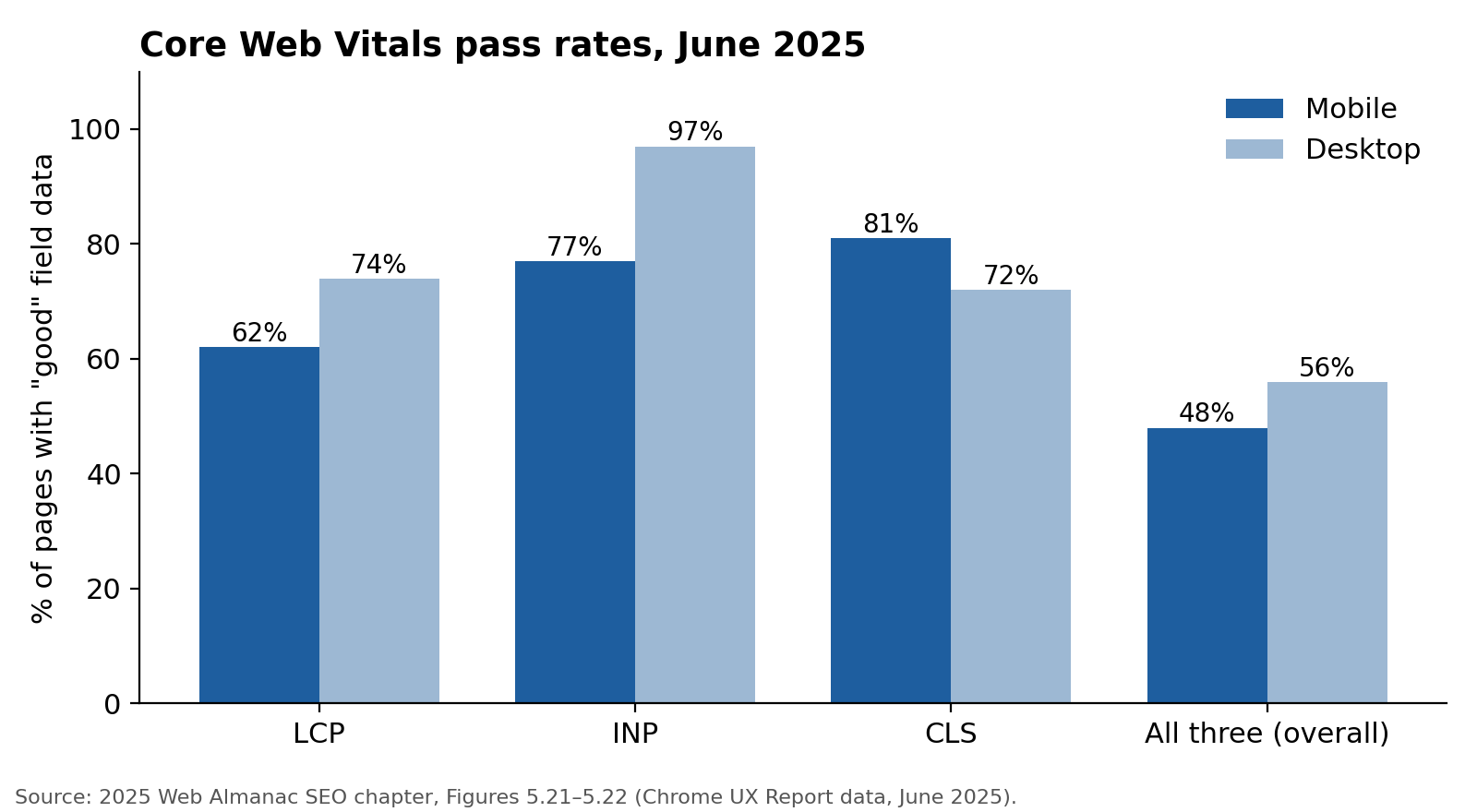
Use field data (Chrome UX Report, via Search Console's Core Web Vitals report or PageSpeed Insights) grouped by template. Google's "good" thresholds at the 75th percentile:
- LCP ≤ 2.5 s
- INP ≤ 200 ms (INP replaced First Input Delay on 12 March 2024)
- CLS ≤ 0.1
Also confirm HTTPS on every URL (91.7% of desktop pages use it), no mixed content, and that the mobile page contains the same content, links and structured data as desktop. Google's Mobile-Friendly Test was retired in December 2023; use Lighthouse for mobile checks. Detail in the Core Web Vitals guide.
10. Structured data
Validate markup with the Rich Results Test and the Schema Markup Validator. Check:
- Errors on templates, which repeat across every page using them.
- Consistency between markup and visible content (prices, ratings, availability).
- Whether the type still produces a visible result. Product, Article, BreadcrumbList, Organization and others do. FAQ rich results stopped appearing in Google on 7 May 2026 and HowTo in 2023, so missing FAQ or HowTo markup isn't a technical finding. See schema markup.
11. International and hreflang
For multilingual or multi-regional sites:
- Every hreflang set is reciprocal (each page references the others, and itself).
- Language and region codes are valid (
en-GB, noten-UK). - Each hreflang URL returns 200 and is self-canonical.
- An
x-defaultexists where a fallback makes sense.
The hreflang tags guide lists the five errors that break it.
12. Log files and crawl budget (large sites only)
Server logs show what Googlebot actually requested, how often and with what response. They reveal crawl spent on parameters, redirects and 404s, and important sections Googlebot rarely visits.
Google's own guidance says crawl budget is a concern for sites with over a million unique pages changing about weekly, or over 10,000 pages changing daily. Below that, crawl-budget optimisation rarely moves results. Fix duplicates and soft 404s for hygiene and move on.
13. AI crawler access
Review robots.txt rules for AI crawlers such as GPTBot, ClaudeBot and PerplexityBot, and the Google-Extended token (which governs use of content for Google's AI models, not Google Search crawling). Rules for these grew quickly: GPTBot was named in 4.5% of desktop robots.txt files in 2025, up from 2.9% in 2024, and ClaudeBot in 3.6%, up from 1.9%.
Allowing or blocking them is a business decision. The audit finding is when the current rules weren't chosen deliberately, for example a security plugin blocking every AI crawler by default on a site that wants to be cited in AI answers.
On llms.txt: about 2% of sites have a valid one, and Google has said it doesn't use the file. Treat it as optional; see llms.txt explained.
How to rank technical issues by severity
Crawlers label issues as errors, warnings and notices. Those labels describe technical correctness, not business impact. Use severity instead:
| Severity | Definition | Examples |
|---|---|---|
| Critical | Stops pages being crawled, rendered or indexed at scale | Sitewide noindex or robots.txt block; robots.txt returning 5xx; main content only visible after JavaScript and not rendered; canonical on every page pointing to the homepage |
| High | Costs visibility on important pages or templates | Google-selected canonical differs on money pages; key templates failing Core Web Vitals; redirect chains on high-traffic URLs; orphaned category pages; hreflang errors on main markets |
| Medium | Wastes crawl or weakens signals | Internal links to 404s; 302s for permanent moves; noindexed URLs in sitemap; invalid structured data on secondary templates |
| Low | Hygiene; fix when convenient | Missing alt text on decorative images; long title tags; minor HTML validation warnings |
Then order within each band by the traffic or revenue the affected pages carry. A medium issue on your top category can outrank a high issue on an archive nobody visits.
Writing findings developers will act on
A technical SEO audit report is only as useful as its weakest finding. Write each one in the same structure:
| Field | Example |
|---|---|
| Finding | Paginated category pages canonicalise to page 1 |
| Severity | High |
| Affected | Category template — 312 URLs (/category/*?page=2+) |
| Evidence | URL Inspection on /shoes?page=3: Google-selected canonical = /shoes; products on pages 2+ "Discovered – currently not indexed" |
| Why it matters | Products listed only on deeper pages lose their main internal link path |
| Fix | Make each paginated page self-canonical; keep <a href> links between pages |
| Effort | ~1 day (template change) |
| How to verify | Re-inspect 5 sample URLs after deploy; watch Page indexing for affected products over 4–6 weeks |
Findings written this way can go straight into a ticketing system.
If you'd rather have this done for you, the Technical-Only Deep Dive delivers the full technical review with code-level fixes, and the Site SEO Audit adds content, links and AI visibility.
Frequently asked questions
What is included in a technical SEO audit? Crawl controls (robots.txt, meta robots), server responses and redirects, canonical tags, XML sitemaps, JavaScript rendering, site architecture and internal links, Core Web Vitals, HTTPS, structured data, hreflang, and for large sites, log file and crawl budget analysis.
How long does a technical SEO audit take? A site with a few hundred pages can be audited in two to three days. Large or JavaScript-heavy sites take longer, mainly for rendering analysis, log processing and writing findings developers can implement.
Can I do a technical SEO audit myself? Yes. Search Console, PageSpeed Insights, the Rich Results Test and Screaming Frog's free 500-URL crawl cover most checks on a small site. The hard parts are interpreting rendering and canonical conflicts, and deciding what matters most.
How often should you run a technical SEO audit? Annually as maintenance, and always before and after migrations, redesigns or platform changes. Monitor Search Console's Page indexing and Core Web Vitals reports monthly between audits.
Is crawl budget something every site should audit? No. Google says it matters mainly for sites with over a million pages, or over 10,000 pages changing daily. Smaller sites are generally crawled efficiently.
What's the difference between a technical SEO audit and an SEO audit? A technical audit checks whether search engines can access and process the site. A full SEO audit adds content, keyword targeting, backlinks, competitors and AI visibility on top.
Get your technical SEO audit done for you
Running all thirteen steps correctly takes real crawler expertise — reading a raw-vs-rendered HTML diff, telling a harmless robots.txt 404 from a dangerous 5xx, and ranking findings by revenue impact rather than crawler-label severity. TapasSEO's Technical-Only Deep Dive runs the full pipeline above against your site and hands back a prioritised, developer-ready findings list — not a list of errors with no order.