
This SEO audit checklist puts checks in the order that matters: first whether Google can crawl and index the site at all, then the health of your important pages, then signal waste, then hygiene. Each item names the tool to use and what "pass" looks like. Work top to bottom and stop to fix anything critical before moving on.
For the reasoning behind each step, see the full SEO site audit guide; for crawl, rendering and indexing detail, the technical SEO audit guide.
How to use this checklist
- Connect Google Search Console and export 16 months of performance data.
- List your most important pages (revenue, leads, top traffic).
- Crawl the site as Googlebot smartphone with JavaScript rendering on.
- Work through each table. Mark each check Pass, Fail or N/A.
- For every Fail, record the affected URLs and the fix, then prioritise by impact on your important pages.
Critical: can Google crawl and index the site?
| # | Check | Tool | Pass condition |
|---|---|---|---|
| 1 | Site appears in Google | site: search | Results appear; no staging or junk URLs |
| 2 | robots.txt responds correctly | Browser, Search Console | Returns 200 (or 404); never 5xx |
| 3 | robots.txt doesn't block important sections, CSS or JS | Browser, crawler | No Disallow: / for *; resources allowed |
| 4 | No unintended noindex | Crawler | noindex only on pages meant to be excluded |
| 5 | Important pages indexed | Search Console URL Inspection | "URL is on Google" |
| 6 | Google-selected canonical matches yours on key pages | URL Inspection | Same URL |
| 7 | Main content visible to Google | URL Inspection → rendered screenshot | Full content renders |
| 8 | One canonical site version | Browser | http/https, www/non-www, trailing-slash variants all redirect to one |
| 9 | No sitewide server errors | Search Console crawl stats | 5xx share near zero |
| 10 | Page indexing report reviewed | Search Console → Pages | Important URLs not in "Crawled/Discovered – not indexed" |
High: are your important pages healthy?
| # | Check | Tool | Pass condition |
|---|---|---|---|
| 11 | Core Web Vitals (field data) by template | Search Console CWV, PageSpeed Insights | LCP ≤ 2.5 s, INP ≤ 200 ms, CLS ≤ 0.1 at 75th percentile |
| 12 | Mobile content parity | URL Inspection (smartphone) | Same content, links and structured data as desktop |
| 13 | HTTPS everywhere, no mixed content | Crawler | All URLs HTTPS |
| 14 | Unique, descriptive title on key pages | Crawler, SERP | Not duplicated; not rewritten by Google |
| 15 | One H1 per page | Crawler | Present and non-empty |
| 16 | No cannibalisation on priority queries | Search Console queries by page | One URL per primary query |
| 17 | Important pages within 3 clicks of homepage | Crawler | Click depth ≤ 3 |
| 18 | No orphan priority pages | Crawler + sitemap + analytics | Every priority page has internal links |
| 19 | No redirect chains on key URLs | Crawler | Single hop |
| 20 | Internal links don't point at 4xx | Crawler | Zero |
| 21 | Canonical tags in raw HTML | Crawler (raw vs rendered) | Present before JavaScript |
| 22 | hreflang valid and reciprocal (if multilingual) | Crawler | No missing return links; valid codes |
| 23 | Traffic trend understood | Search Console, year-on-year | Any drop explained |
Medium: are you wasting signals?
| # | Check | Tool | Pass condition |
|---|---|---|---|
| 24 | XML sitemap contains only indexable 200 URLs | Crawler (sitemap mode) | No redirects, 404s, noindex or canonicalised URLs |
| 25 | Sitemap in robots.txt and submitted | Search Console | Submitted, processed |
| 26 | lastmod reflects real changes | Sitemap | Not all identical dates |
| 27 | 302s not used for permanent moves | Crawler | 301/308 for permanent |
| 28 | Soft 404s fixed | Search Console | None on real pages |
| 29 | Faceted/parameter URLs controlled | Crawler, robots.txt | Unneeded combinations not crawlable |
| 30 | Structured data valid on templates | Rich Results Test | No errors |
| 31 | Meta descriptions on key pages | Crawler | Present and unique |
| 32 | No invalid elements in <head> | Crawler / view-source | Only title, meta, link, script, style, base, noscript, template |
| 33 | Thin or duplicate pages handled | Crawler, Search Console | Merged, improved, noindexed or removed |
| 34 | Backlink profile reviewed | Backlink tool | No manual action; lost key links reclaimed |
| 35 | AI crawler rules deliberate | robots.txt | GPTBot/ClaudeBot/PerplexityBot rules match business decision |
Low: hygiene
| # | Check | Tool | Pass condition |
|---|---|---|---|
| 36 | Alt text on meaningful images | Crawler | Descriptive alt present |
| 37 | Descriptive anchor text | Crawler | Few "click here"/"read more" |
| 38 | Readable URLs | Crawler | Lowercase, hyphenated, no session IDs |
| 39 | Custom 404 page | Browser | Returns 404 status with useful links |
| 40 | Crawl budget (only 1M+ pages, or 10k+ changing daily) | Server logs | Googlebot reaches important sections |
Remove these from old checklists
| Old item | Why remove it |
|---|---|
| "Run the Mobile-Friendly Test" | Google retired it on 1 December 2023; use Lighthouse |
| "Add FAQ / HowTo schema for rich results" | FAQ rich results ended 7 May 2026; HowTo in 2023 |
| "Fix First Input Delay" | INP replaced FID on 12 March 2024 |
| "Keyword density 1–2%" | Not a ranking concept |
| "Meta keywords tag" | Ignored by Google |
| "Get the site health score above 90" | Tool-specific; not a Google metric |
| "Optimise crawl budget" on small sites | Google says it matters for very large or fast-changing sites |
Download the checklist
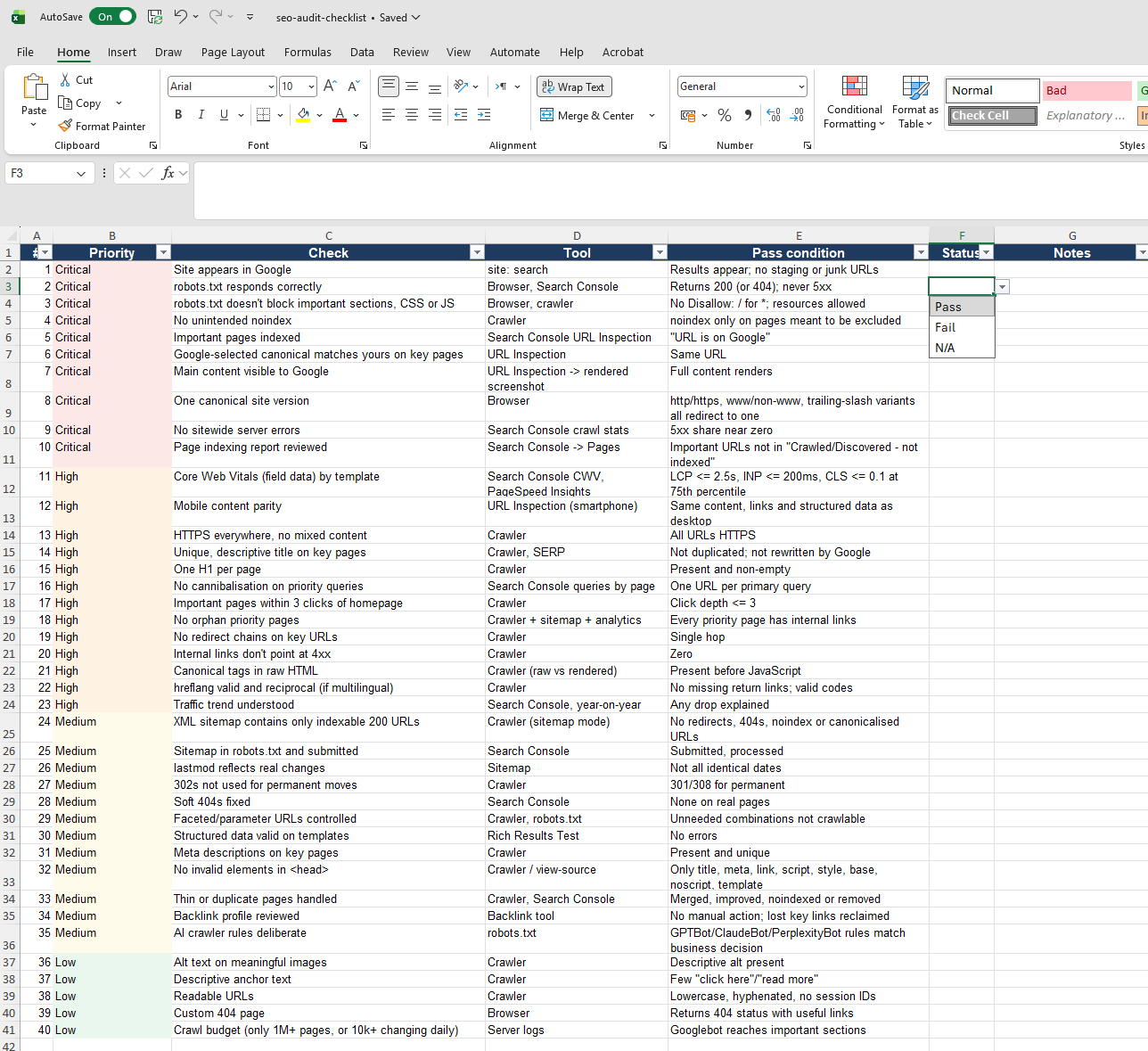
Download the checklist with all 40 checks, tools and pass conditions, plus Status and Notes columns: Excel (.xlsx) · CSV.
If you'd rather hand the whole list to someone else, the TapasSEO Site SEO Audit runs every check across your site and returns the failures ranked by impact, with fixes your developer can ship.
Frequently asked questions
What should an SEO audit checklist include? Crawl and index access, indexation status, canonicalisation, rendering, Core Web Vitals, mobile parity, HTTPS, titles and headings, cannibalisation, internal links, redirects, sitemaps, structured data, hreflang, backlinks and AI crawler rules — in that rough order of priority.
How long does it take to work through an SEO audit checklist? A few hours for a small site using free tools. Larger sites take longer, mostly because each Fail needs investigation across many URLs.
Is there a technical site audit checklist? Checks 2–13, 19–22, 24–30, 32 and 40 are the technical subset. The technical SEO audit guide explains how to do each.
Can I use this checklist for an ecommerce site? Yes; add checks for faceted navigation, product variants and out-of-stock pages from the ecommerce SEO audit guide.
A checklist tells you what to check. It does not tell you how to prioritise the failures by business impact once you've run it — which Fail costs you the most traffic or revenue, and which one to fix first with the time you actually have.